Mixpanel
Connect Mixpanel to Customerscore to sync product analytics and event data.
How to Connect Mixpanel to Customerscore
Step 1: Prepare Mixpanel API Access
-
Log in to your Mixpanel account. We'll need the project ID from your account URL (e.g.,
https://eu.mixpanel.com/project/12345— in this case,12345is the project ID). -
Navigate to Settings → Organization Settings → Service accounts and click the Add Service Account button in the top-right corner.
-
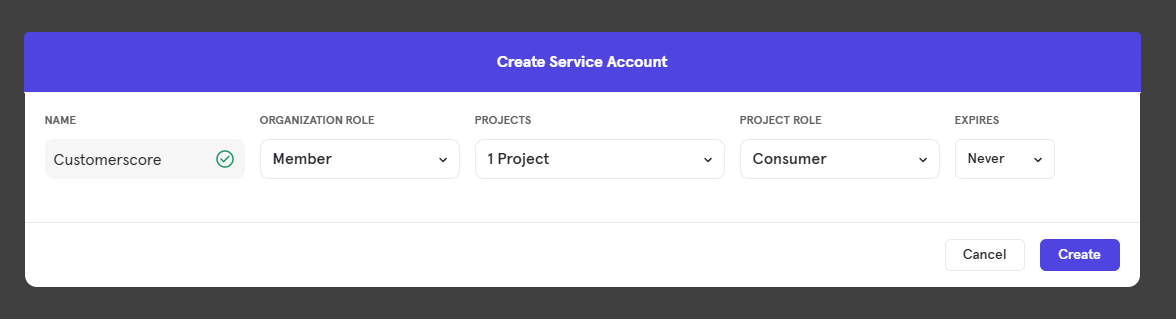
In the form enter
Customerscoreas the Name, set the Organization Role toMember, select your Project, set the Project Role toConsumer, and set Expires toNever. Click the Create button at the bottom of the form to create a service account.
Step 2: Connect in Customerscore
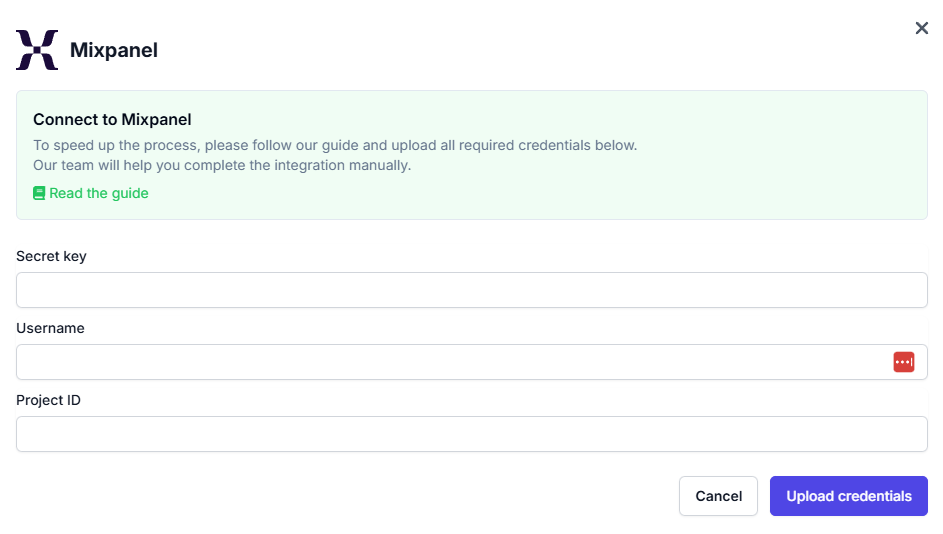
After creating the Service Account, upload the Secret key together with the Username and project ID into Customerscore under Settings → Providers (opens in a new tab) by clicking Connect to Mixpanel and filling out the form.
What Happens Next?
Once we receive all the required information, we'll begin integrating your Mixpanel account with the Customerscore app.