AI Health Scoring
Customerscore.io's AI Health Scoring analyzes every customer in your portfolio individually and assigns a dynamic health score from 1 (healthy) to 5 (high churn risk). Unlike manual Health Scores that require you to define rules and recalibrate regularly, AI Health Scoring learns from your actual data and auto-adjusts as new information comes in.
Each customer receives not just a number, but a clear explanation of what's driving their health up or down.
What You Get
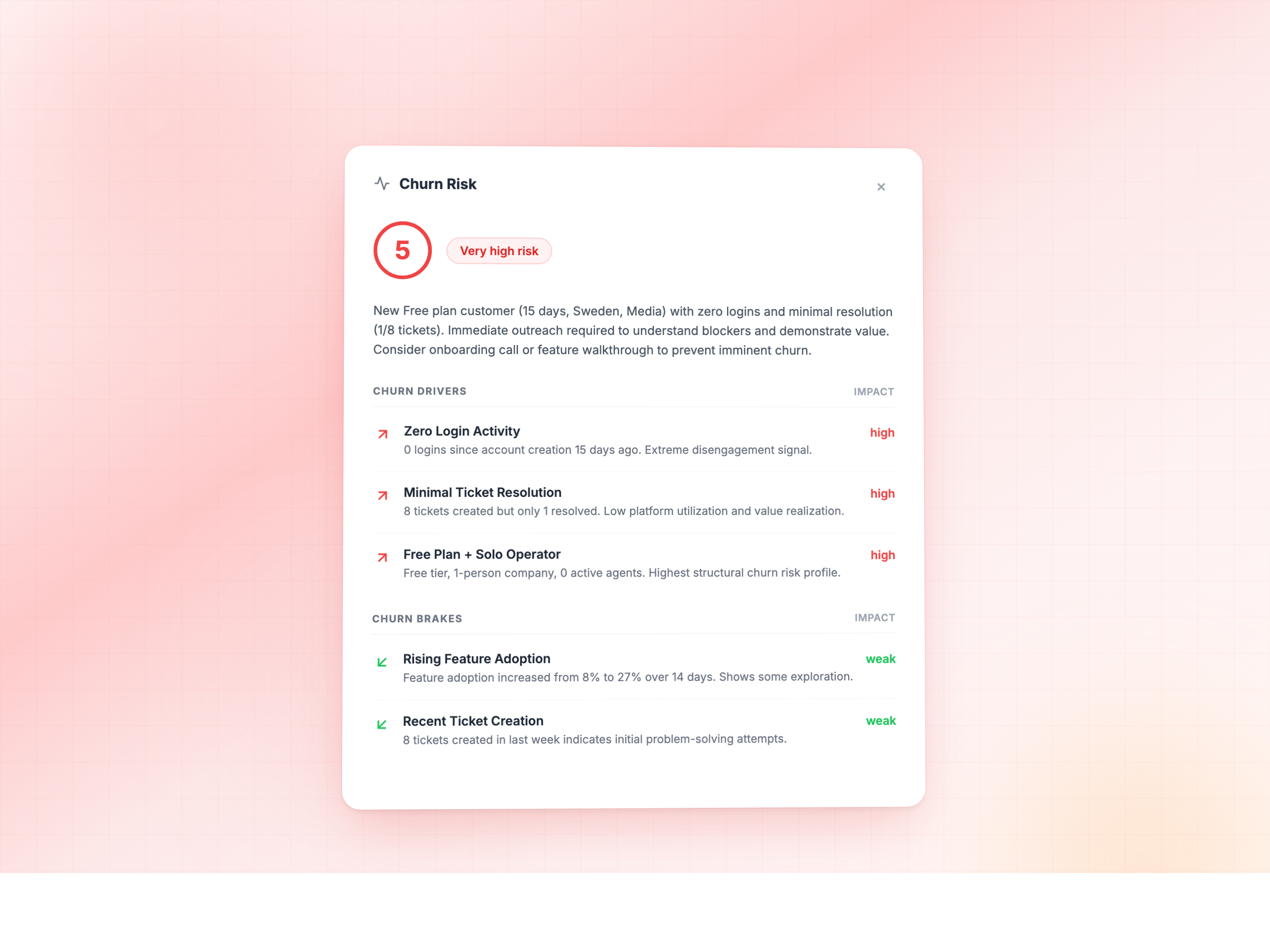
For every scored customer, the system provides:
- Health Score (1–5): daily updated score where 1 means healthy and 5 means high churn risk.
- Risk Drivers: up to 3 specific factors pulling the score down for this customer (for example, "Zero engagement despite active subscription" or "Usage dropped 60% in the last 30 days").
- Health Drivers: up to 3 factors supporting the customer's health (for example, "Consistent monthly usage growth" or "Recently adopted a new feature").
- Score Explanation: a natural-language summary explaining the score in context.
Scores update daily. The underlying deep-dive analysis refreshes every 14 days to capture longer-term patterns.
How It Works
AI Health Scoring runs in two stages:
1. Deep-Dive Analysis
The system analyzes each customer's full history across all connected data sources — billing patterns, product usage trends, engagement signals, and support interactions. This analysis is stored per customer and refreshed every 14 days.
2. Daily Scoring
Every day, the AI evaluates each customer against the latest data. Customers whose data has changed significantly get rescored with fresh context. The result is an up-to-date 1–5 health score with explainable factors.
The AI is powered by large language models (LLMs) that combine pattern recognition with contextual understanding. This means it doesn't just flag "login count dropped" — it understands that a customer who went from daily usage to weekly usage in their third month has a fundamentally different risk profile than one who's always been a weekly user.
What Data Do You Need
Required: Billing Data
Connect your billing provider to give the model revenue and subscription context.
This gives the model access to MRR, plan changes, renewal dates, payment status, and billing cycle history. Even billing data alone provides useful churn signals — for example, customers who switch from annual to monthly billing show significantly higher churn risk.
Recommended: Product Usage Data
Adding product analytics dramatically improves scoring accuracy by revealing behavioral patterns invisible in billing data alone.
Supported: Mixpanel, PostHog, Segment, custom API/database sources
Usage data lets the model detect engagement drops, feature adoption gaps, and usage pattern changes weeks before they show up as a cancellation.
Optional: CRM & Support Data
Adds relationship and support context to the scoring model.
Supported: HubSpot, Salesforce, Intercom, Freshdesk
Support ticket volume, response sentiment, and CSM activity history help the model distinguish between a quiet-but-happy customer and a quiet-because-they've-given-up customer.
How Much History Do You Need
- Minimum: 2 months of historical data for the model to identify meaningful patterns.
- Churned customers: The model learns best when your data includes at least 40–50 historically churned customers. If you have very few churned customers, the system can still operate by comparing active customers against your healthiest, longest-retained accounts — but scoring accuracy improves with more churn history.
AI Health Scoring works best with 100+ active customers and 40+ historical churn events. It can operate with fewer, but scoring accuracy scales with data volume.
Where to Access Scores
In Customerscore.io
Health scores appear directly in your customer portfolio. You can sort, filter, and segment customers by score. Scores also feed into Smart Alerts and automated Playbooks — for example, you can trigger a re-engagement email when a customer moves from score 3 to score 4.
In Your CRM / CS Platform
Scores can be pushed to your existing tools via Webhooks. Your team can see health scores directly in HubSpot, Salesforce, Intercom, or any tool that accepts webhook data — no need to switch between platforms.
Via MCP (Slack / Claude)
If you use the Customerscore.io MCP server, you can query health and churn data using natural language:
- "Who are my highest-risk customers right now?"
- "Show me customers who churned last month"
- "Why is [customer name] at risk?"
- "How much MRR did we lose this quarter?"
Available MCP tools:
| Tool | What it does |
|---|---|
get_churn_risk_customers | Returns top at-risk customers with AI-generated churn factors |
list_churned_customers | Lists churned customers with date-range filtering |
get_churn_analytics | Monthly churn breakdown — customer count and lost MRR |
get_churn_reasons | Aggregated cancellation reasons with MRR impact |
get_lost_mrr | Total MRR lost over a configurable time window |
get_dashboard_trending_customers | Customers with the biggest score changes (improving or declining) |
Via API
All health scoring data is available through the Customerscore.io API for custom integrations.
Using Scores Effectively
Prioritize Outreach
Sort your portfolio by health score to focus your team's time on customers who need attention most. Score 4–5 customers should get proactive outreach; score 1–2 customers are healthy and can be managed with a lighter touch.
Set Up Automated Playbooks
Combine health scores with Playbooks to automate retention actions:
- Score moves to 4: Send a personalized check-in email.
- Score moves to 5: Create a CRM task for the account owner.
- Score drops from 4 to 2: Log a win and note what worked.
Understand Why, Not Just Who
The risk drivers and health drivers are often more valuable than the score itself. They tell you exactly what to address in your outreach. If a customer's top risk driver is "Feature X usage dropped to zero after month 2," your CSM knows exactly what to ask about.
Watch Trends, Not Snapshots
Use get_dashboard_trending_customers or the trending view in the dashboard to spot customers whose scores are changing rapidly. A customer moving from score 2 to score 4 over two weeks is a more urgent signal than a customer who's been sitting at score 3 for months.
How It Compares to Manual Health Scoring
| Aspect | Manual / Rule-Based Scoring | AI Health Scoring |
|---|---|---|
| Setup | You define metrics, weights, and thresholds | Automatic — learns from your data |
| Maintenance | Requires regular recalibration as your business evolves | Auto-adjusts as new data comes in |
| Explainability | Shows which rules triggered | Shows specific per-customer drivers and brakes |
| Adaptability | Doesn't adapt to new patterns, segments, or seasonal changes | Continuously learns from changing data |
| Prerequisite knowledge | You need to know upfront what drives churn | The model discovers what drives churn from your data |
AI Health Scoring works alongside your existing Health Score — you don't need to choose one or the other. Many teams use the traditional Health Score for day-to-day account management and AI Health Scoring as an early warning system.
Data Privacy & Security
- Your data is processed by AI providers (Anthropic Claude API and OpenAI Platform API) solely to generate scoring results.
- Data sent to AI providers is deleted after processing.
- Both providers are listed as Sub-Processors under the Customerscore.io Data Processing Agreement (opens in a new tab) and List of Processors (opens in a new tab).
- AI Health Scoring does not process payment card data, passwords, or special categories of personal data (Article 9 GDPR).
- Full terms are available in our AI Features Terms of Use (opens in a new tab).
Your data is never used to train AI models. Anthropic and OpenAI process your data solely to generate scoring results and delete it after processing.
FAQ
How often are scores updated?
Scores update daily. The deep-dive analysis behind the scores refreshes every 14 days.
Can I customize what the model looks at?
The model automatically uses all connected data sources. The more data sources you connect, the more accurate the scoring becomes. You don't need to manually configure which metrics matter — the AI figures that out from your data.
What if I have very few churned customers?
The model can still work by comparing your active customers against the behavior patterns of your healthiest, longest-retained accounts. Customers who deviate significantly from that "golden path" receive higher risk scores. Accuracy improves as more churn history accumulates.
Can I use AI scoring and manual health scoring at the same time?
Yes. They serve complementary purposes. Your manual Health Score reflects your team's domain knowledge and defined criteria. AI Health Scoring adds a data-driven early warning layer on top of that.
Which AI providers process my data?
Anthropic (Claude API) and OpenAI (Platform API). Both are engaged as Sub-Processors. Your data is not used for model training and is deleted after processing.
Is there a minimum number of customers?
AI Health Scoring works best with 100+ active customers and 40+ historical churn events. It can operate with fewer, but scoring accuracy scales with data volume.